How a Browser Works: A Beginner-Friendly Guide to Browser Internals
Introduction
We use browsers every day — for work, productivity, learning, shopping, and entertainment. From checking emails to watching videos, most of our digital life runs inside a browser.
A browser is an application program that allows us to access and use web applications without installing them as traditional desktop software. Instead of downloading separate apps for every service, we simply open a website and start using it instantly.
You can think of your browser as an operating system for websites inside your computer. When you enter a URL and press Enter, a complex system immediately springs into action. Multiple components begin working together — fetching resources, processing code, calculating layouts, and rendering visuals — all to build the web page you see on your screen.
What looks simple on the surface is actually a highly coordinated process happening in milliseconds.
In this article, we’ll break down what really happens behind the scenes when a browser loads a webpage.
But what is a browser really ?
A browser is not just an application that “opens websites.” It is a complex software system designed to retrieve, interpret, and present web content to users in a meaningful way.
At its core, a browser fetches data from servers on the internet. When you enter a URL, the browser sends a request to a server and receives resources such as HTML, CSS, and JavaScript files in response. But receiving files is only the beginning.
The browser then understands and processes these files. It parses HTML to determine the structure of the page, applies CSS to style it, and executes JavaScript to enable interactivity. After interpreting all of this code, the browser converts it into a fully rendered visual interface that you can see and interact with.
Beyond just displaying content, a browser also handles user interactions such as clicks, typing, scrolling, form submissions, and dynamic updates — often without reloading the page.
In simple terms, a browser is a translator between the web and humans. It takes raw code from servers and transforms it into structured, interactive, and visually meaningful experiences.
Very Basic Idea of Parsing
Before understanding how browsers parse HTML and CSS, let’s first understand what parsing actually means in the simplest way possible.
Parsing is the process of taking raw text and converting it into a structured format that a system can understand and work with.
Consider a simple math expression:
2 + 3 × 4
To a human, this is easy to solve. But for a computer, this is just a string of characters: "2 + 3 × 4".
The system must first break it into smaller meaningful pieces called tokens:
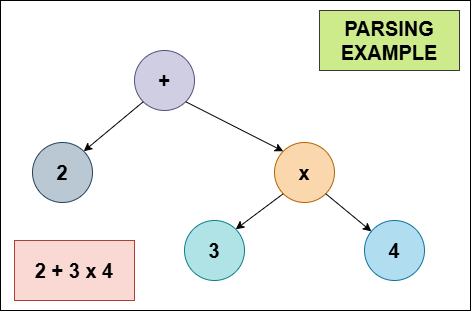
Then it must understand the structure and rules of the expression. According to mathematical precedence, multiplication happens before addition. So the system interprets it like this:
2 + (3 × 4)
Then it evaluates:
3 × 4 = 12
then,
2 + 12 = 14
Components of a Browser
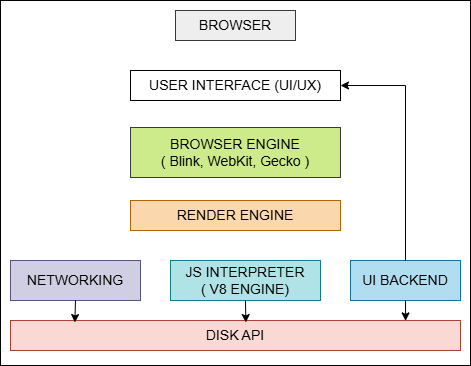
Modern browsers such as Google Chrome, Mozilla Firefox, and Safari are not single-layer applications. They are complex systems made up of multiple coordinated components that work together to fetch, process, and display web content in milliseconds.
Let’s explore these components in a structured way.
The User Interface is the visible layer of the browser — the part users directly interact with. It includes the address bar, navigation buttons (back and forward), refresh button, tabs, bookmarks, extensions, and settings menus.
Although different browsers have different visual designs, their functionality remains similar. The UI’s role is purely interaction-based. When a user enters a URL or clicks a link, the UI does not fetch or render the webpage itself. Instead, it passes the request to the browser engine, which begins the internal loading process.
In simple terms, the UI collects user input and displays output, but it does not handle rendering logic.
The browser engine acts as the central coordinator of the browser. It connects the user interface with the rendering engine and manages the overall workflow.
When a navigation request is triggered, the browser engine controls what happens next. It coordinates networking, rendering, JavaScript execution, and security checks. It also manages browser state, session history, and navigation rules such as enforcing the same-origin policy.
In modern browsers, the browser engine also manages multiple processes for better security and performance. It ensures that different tabs and websites operate in isolated environments, reducing the risk of crashes and security vulnerabilities.
You can think of the browser engine as the manager that supervises all other subsystems.
The rendering engine is responsible for turning web code into visual content on the screen. Once HTML and CSS files are received from the server, the rendering engine begins parsing them.
First, HTML is parsed to create the Document Object Model (DOM), which represents the structure of the webpage. Then CSS is parsed to create the CSS Object Model (CSSOM), which represents styling rules. These two structures are combined to form the render tree, which contains only the elements that need to be displayed.
After building the render tree, the engine calculates layout. This step determines the size and position of each visible element. Once layout is complete, the browser paints pixels on the screen and composites layers to produce the final visual output.
Different browsers use different rendering engines. For example, Chrome uses Blink, Firefox uses Gecko, and Safari uses WebKit. Although implementations differ, the fundamental rendering process remains conceptually similar across browsers.
Before rendering can begin, the browser must retrieve resources from the server. This is handled by the networking layer.
When a URL is entered, the browser may first check its cache. If the resource is not cached or is expired, the browser performs a DNS lookup to convert the domain name into an IP address. It then establishes a connection using protocols such as TCP or QUIC and, in the case of HTTPS, performs a TLS handshake for secure communication.
After the connection is established, the browser sends an HTTP request and receives a response from the server. The response may include HTML documents, CSS stylesheets, JavaScript files, images, fonts, and API data. Networking is optimized and often happens in parallel to improve performance.
Rendering can begin as soon as the browser starts receiving HTML; it does not need to wait for the entire document to download.
Modern web applications rely heavily on JavaScript for interactivity. The JavaScript engine is responsible for executing this code.
In Chrome, the JavaScript engine is V8. Firefox uses SpiderMonkey, while Safari uses JavaScriptCore.
The JavaScript engine parses code into an internal structure (often an Abstract Syntax Tree), compiles it using Just-In-Time (JIT) compilation techniques, and executes it. It also manages memory through garbage collection.
The JavaScript engine interacts closely with the DOM and browser APIs. When JavaScript modifies the DOM, it may trigger layout recalculations or repainting in the rendering engine. This tight integration allows dynamic updates without reloading the page.
The UI backend is responsible for drawing standard interface components such as input fields, dropdown menus, scrollbars, and context menus. Instead of implementing all visual controls from scratch, browsers rely on operating system APIs to render native components. This ensures that the browser integrates smoothly with the operating system’s look and feel.
This is why form elements may appear slightly different on Windows, macOS, or Linux systems.
Browsers also include storage mechanisms to save data locally. This includes cookies, HTTP cache, Local Storage, Session Storage, IndexedDB, and Service Worker cache.
Storage enables faster page loading, persistent login sessions, offline functionality, and saved user preferences. Modern browsers enforce strict origin-based isolation, meaning data stored by one website cannot be accessed by another without permission.
Flow of a Browser: From URL to Screen

Now that we understand what a browser is and what components it has, let’s walk through the complete flow of what happens after you enter a URL.
When you type a URL into the address bar and press Enter, the browser’s networking layer sends a request to a server. The server responds with resources required to build the webpage. The most important of these are HTML, CSS, and JavaScript files — the three core technologies of the web.
HTML defines the structure of the page
CSS defines how the page looks
JavaScript defines how the page behaves
Once the browser starts receiving the HTML document, the rendering process begins.
As soon as HTML arrives, the rendering engine begins parsing it. Parsing means reading the raw text and converting it into a structured format the browser can understand.
For example:
<html>
  <body>
    <h1>Hello</h1>
    <p>World</p>
  </body>
</html>
The browser converts this into a tree-like structure called the DOM (Document Object Model).
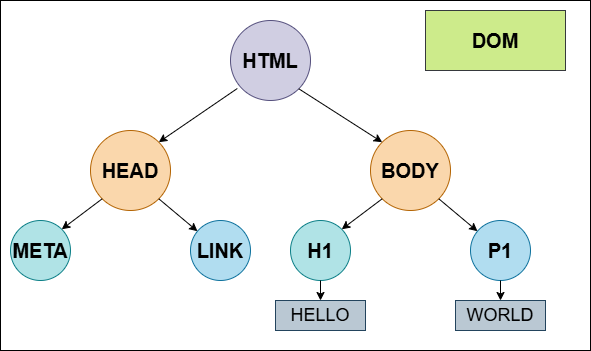
The DOM represents the hierarchical structure of the webpage. Each HTML element becomes a node in this tree. This structure allows the browser to understand relationships between elements, such as parent, child, and sibling nodes.
The DOM is not just a static structure — JavaScript can dynamically modify it. When JavaScript updates the DOM, the browser may need to recalculate layout and repaint parts of the page.
While HTML is being parsed, the browser also processes CSS files.
For example:
h1 { color: purple; }
p { font-size: 16px; }
The browser parses CSS and converts it into another structured tree called the CSSOM (CSS Object Model).
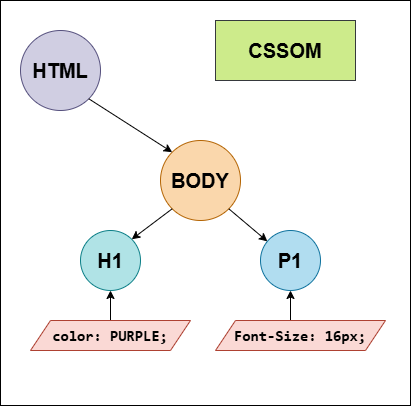
The CSSOM contains all styling rules in a format the browser can work with programmatically. It maps selectors to styling properties and determines how styles cascade and inherit across elements.
Just like the DOM represents structure, the CSSOM represents styling logic.
After building both the DOM and CSSOM, the browser combines them to create the Render Tree.
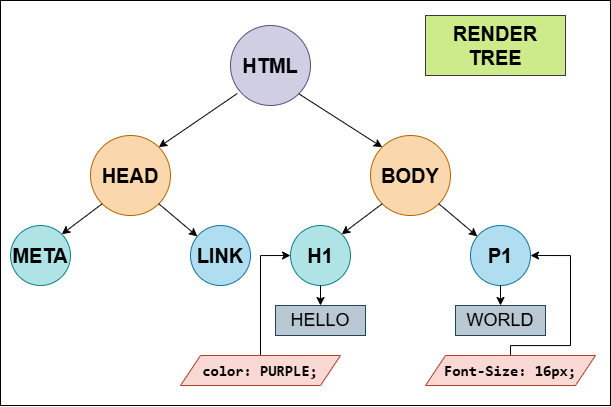
The Render Tree contains:
Only visible elements (elements with
display: noneare excluded)Final computed styles after resolving inheritance and cascading rules
The Render Tree is what the browser actually uses to prepare visual output. It is a visual representation of the page, not just structural or styling information separately.
This is the point where structure and design truly merge.
Once the Render Tree is constructed, the browser performs the Layout phase, sometimes called reflow.
During layout, the browser calculates:
Width of elements
Height of elements
Position on the page
Spacing and margins
This phase determines exactly where each element should appear on the screen. If something changes — for example, if JavaScript modifies an element’s size — the browser may need to recalculate layout again. That recalculation is what we call reflow.
You can think of layout as the logical calculation phase of the browser — the part that determines spatial relationships and positioning.
After layout is complete, the browser moves to the painting phase.
Painting is where visual details are filled in. The browser applies:
Colors
Backgrounds
Borders
Shadows
Text styles
At this stage, the browser knows where everything is positioned and what it should look like. It now converts that information into actual drawing instructions.
If layout is the logical brain, painting is the creative brain that fills everything with visual detail.
The final stage is compositing - The final step of rendering.
Modern browsers divide content into layers for performance optimization. These layers are processed, sometimes using the GPU, and then combined together.
Once compositing is complete, pixels are drawn onto the screen — and you see the final webpage.
All of this — networking, parsing, DOM creation, CSSOM creation, render tree building, layout, painting, and compositing — happens in milliseconds.
Conclusion
A browser is much more than just an application that opens websites. Every time you load a page, it performs a complex series of tasks: fetching resources from a server, parsing HTML into the DOM, parsing CSS into the CSSOM, combining them into a render tree, calculating layout, painting visual details, and compositing layers to display the final page.
Each component — from the networking layer to the JavaScript engine and rendering engine — plays a critical role in turning raw code into an interactive, visual experience. Understanding this process gives us a deeper appreciation of how browsers work and why performance, structure, and clean code are so important for the modern web.
Comments
Join the discussionNo comments yet. Be the first to comment.